Releaseo

ProductReleaseo · release communication

Every release
surface,
in one workspace.

The changelog, the in-app announcements, the requests board, the roadmap, the help centre and the hosted public site — one product, one install, one place the loop closes.

Start free

12 surfaces · one install · EU by default · US, UK, or UAE on request

app.releaseo.io / changelog
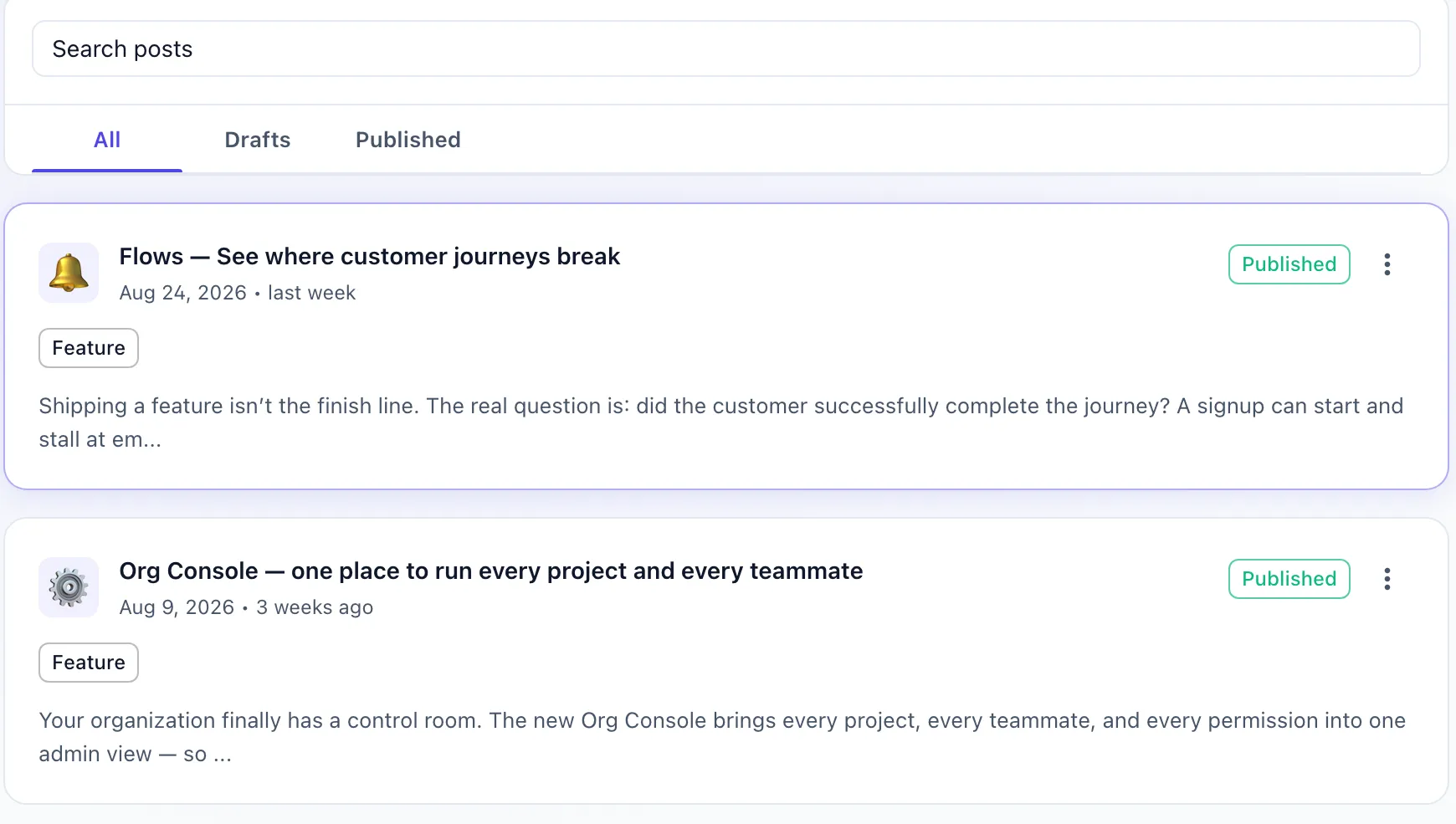
The Releaseo changelog post list: a Search posts field above All, Drafts and Published tabs, then two release cards — 'Flows — See where customer journeys break' dated Aug 24, 2026 and 'Org Console — one place to run every project and every teammate' dated Aug 9, 2026 — each tagged Feature, showing an excerpt of the release note, a green Published chip and a row menu.

Every screen here is the product.Real posts, real dates, out of a live workspace.

Lands where your
users already are.

Not only on your own site.

  • Slack
  • Discord
  • GitHub
  • PostHog
  • Email
  • Webhooks

The whole footprint

Twelve surfaces.
One workspace.

People arrive for the changelog. This is the rest of what comes with it — drawn to scale, so you can see which parts are load-bearing.

  • The three nobody expects from a changelog tool.
  • The nine that make it a workspace, not a feed.

Every block on this map is a page in the dashboard today.

Server-side

Monitor

Watch a business-critical process one step at a time — checkout, signup, password reset, a data import. Your backend reports each step with a single HTTP call.

No SDK, nothing in the browser. Releaseo knows the steps you declared and the calls you sent, and turns them into a live funnel, a run timeline, and a Slack or Discord alert when a step fails.

Changelog

Write the release note once, from a post template. The same post lands in the widget, on your public site and in Slack.

Roadmap

Columns you name yourself, and visibility set per item — not per board.

Inside your product

In-app Launches

A toast, a modal or a banner, shown in your own app to the audience you picked and on the pages you chose.

Each launch can be sourced from the roadmap item or the changelog post it came from, so the announcement and the release never drift into two different stories.

Audience

Users and Segments

Build an audience from recursive AND / OR / NOT conditions — who the user is, the plan they are on, what they have done in your product, and what they have done inside Releaseo.

Save it once, then point a launch or an announcement at it instead of at everybody.

Feature Requests

Ideas arrive from the widget. You approve what becomes public, and the votes do the sorting.

Help Center

Folders and articles, published to your public site — the answers your inbox keeps repeating.

Contact Inbox

Private messages from the widget, encrypted at rest. Nobody reading the database can read them — including us.

Notification Triggers

Post to Slack or Discord when something happens: a built-in Releaseo moment, or an event you define yourself.

Static Data

The vocabulary everything else uses — your own statuses, categories and label groups, defined once.

Widget

One script tag, 2,530 bytes gzipped. The UI runs in an iframe, so it never enters your bundle and sets no cookies.

Public Site

Your changelog, roadmap and help centre on your own domain, built from 16 templates.
Publish

Write it once.
It lands everywhere.

One post fans out to the in-app widget, your hosted public site, Slack, Discord and email — plus an in-app launch if you want one. You write it in one editor and pick the targets on the way out.

Post templates
Save the shape your release notes already take, then start every post from it instead of an empty page.
A real editor
Rich text, images and code, with a preview of what your users will read before any of it leaves the workspace.
Every version kept
Each revision is a full snapshot. Open one, read it end to end, restore it if the old wording was better.
A publish dialog
Publish now or schedule it — and tick the channels this particular post should go out on.

One publish reaches

  • In-app widget
  • Public site
  • Slack
  • Discord
  • Email
  • In-app launch
app.releaseo.io / changelog
The Releaseo changelog post list: a 'Search posts' field above All, Drafts and Published tabs, then two release cards — 'Flows — See where customer journeys break' dated Aug 24, 2026 and 'Org Console — one place to run every project and every teammate' dated Aug 9, 2026 — each tagged Feature, each showing an excerpt of the release note and a green Published chip.

Both of these are published.Each one went out through its own publish dialog — the channels are a decision per post, not a setting you make once and forget.

Feature requests

Requests come in.
A roadmap comes out.

Your users file requests from the widget inside your product or from your public site, vote on the ones they want, and argue it out in the comments. You never have to go and collect any of it.

What arrives lands in a queue, not on your public board. You work that queue — Pending, Approved, Rejected — and attach what survives to the roadmap item it actually belongs to.

Then move that item to Released, and the changelog post is already waiting for you. You are editing a draft, not starting from an empty page.

Publish it and Releaseo tells the people who asked for it — the voters and followers already attached to that roadmap item.

app.releaseo.io / feature-requests
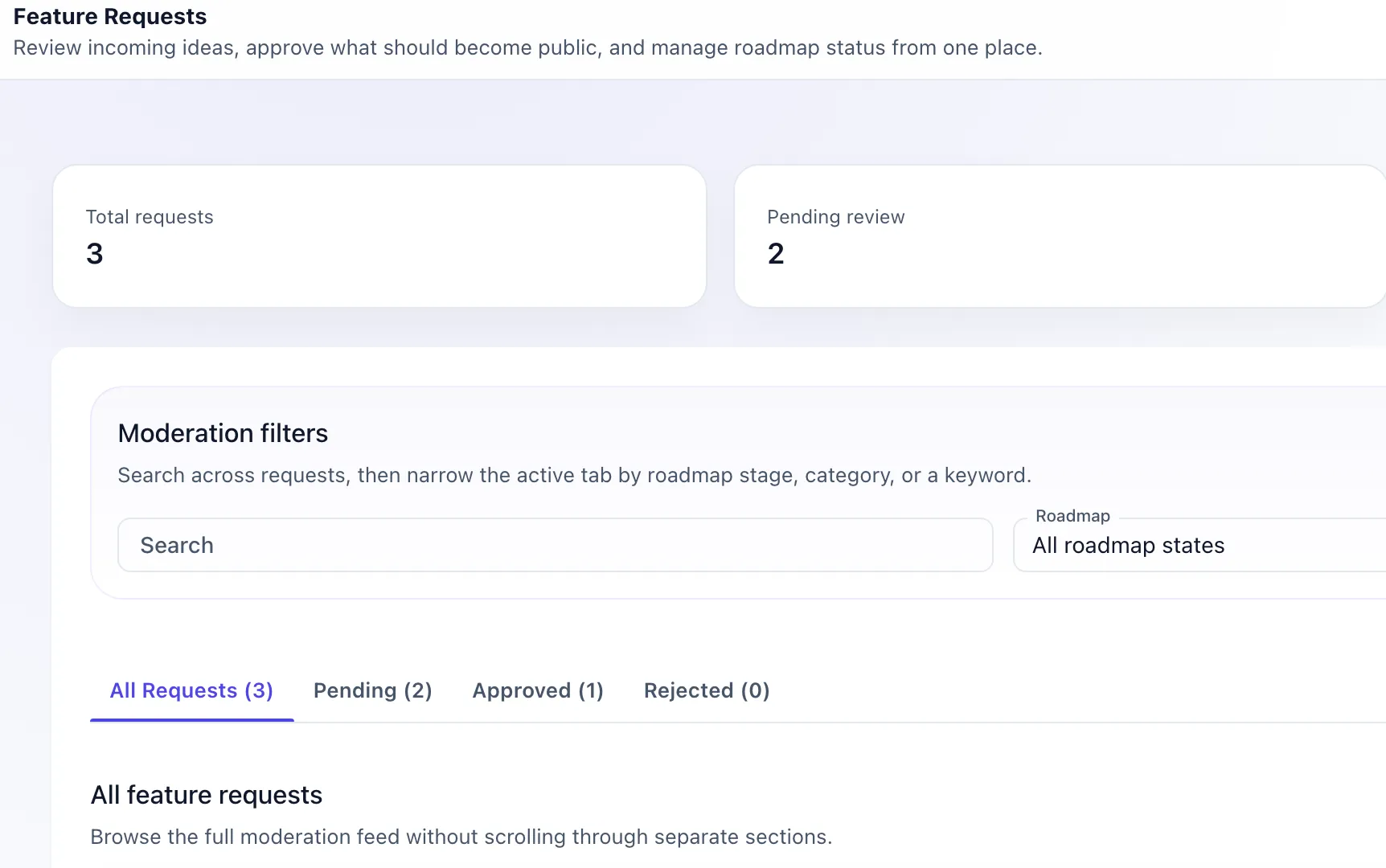
The Releaseo feature requests screen, headed 'Review incoming ideas, approve what should become public, and manage roadmap status from one place.' Stat cards read 4 total requests and 3 pending review. A moderation filters panel holds a search field and an 'All roadmap states' selector, above the tab row All Requests (4), Pending (3), Approved (1), Rejected (0) and the 'All feature requests' feed.

Four queues, one boardPending, Approved and Rejected are separate tabs. Only what you approve is ever visible to a customer.

Every roadmap item then carries its own:

Visibility
Public or internal, decided on the item — not on the whole board.
Priority
Low, medium or high, set on the card where the work already lives.
Requests & followers
Everything you attached rides along, and brings its voters with it.

The embed

One script tag.
Then it is on.

No build step, no npm package, no migration window. Paste it into your layout: the widget is live in your product and in-app launches start delivering.

index.htmlcdn.releaseo.io
<!-- Releaseo widget — paste once, before </body> --><script src="https://cdn.releaseo.io/sdk/v0/loader.js"></script><script>  window.releaseo.init({ publishKey: "pk_live_..." });</script>
app.releaseo.io / in-app-launches
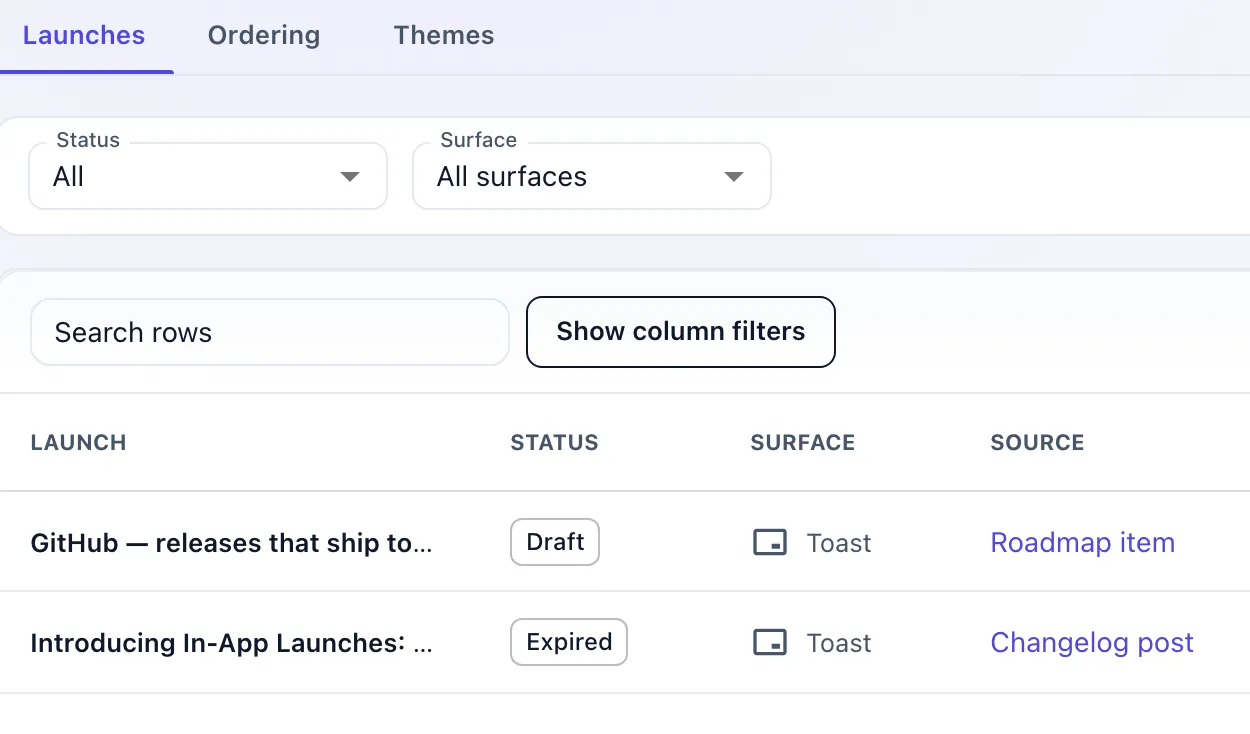
The Releaseo in-app launches list, with Launches, Ordering and Themes tabs, status and surface filters, and a table of LAUNCH, STATUS, SURFACE and SOURCE columns: a draft launch built from a roadmap item and an expired one built from a changelog post, both delivered as toasts.

Same tag, every surface.A launch you build here — toast, modal or banner — is delivered by the loader you already pasted. There is no second install.

  • 2,530bytes, gzipped

    The loader in full — the whole of what your page downloads from us.

  • 0cookies set

    Nothing to add to your cookie banner.

  • 0 KBin your bundle

    The widget UI runs in an iframe, so none of it is ever compiled into your app.

Every release ships
with the answer attached.

Support is the bill you pay after you ship. So the docs live in the same workspace as the release, and what still reaches you arrives triaged.

app.releaseo.io / help-center
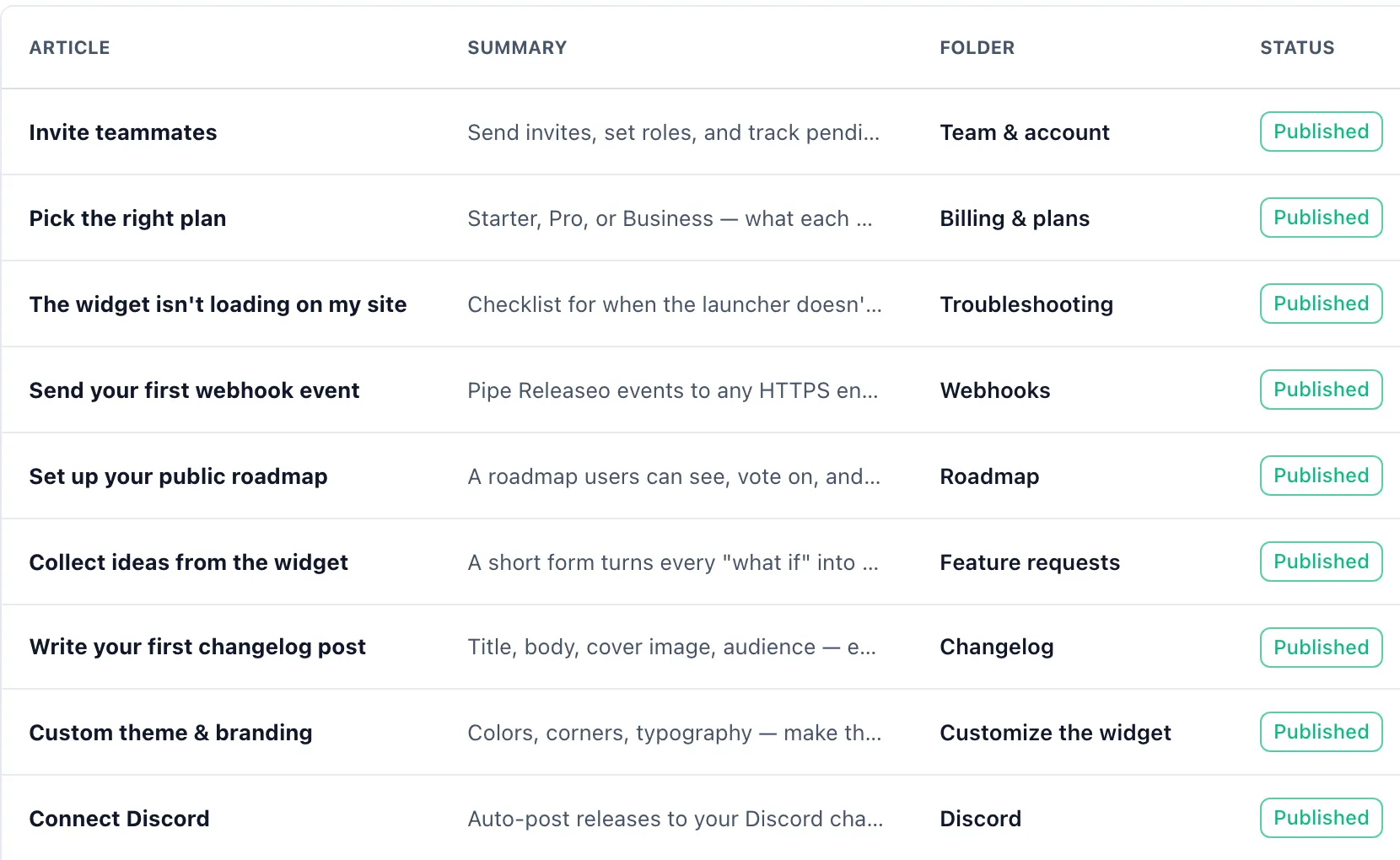
The Releaseo help centre article table with Article, Summary, Folder and Status columns, listing nine published docs — Invite teammates in Team & account, Pick the right plan in Billing & plans, The widget isn't loading on my site in Troubleshooting, Send your first webhook event in Webhooks, Set up your public roadmap in Roadmap, Collect ideas from the widget in Feature requests, Write your first changelog post in Changelog, Custom theme & branding in Customize the widget, and Connect Discord in Discord — each with a summary line and a green Published chip.

Nine articles, nine folders.The folder column is the structure your readers browse on the public site — you are not maintaining two trees.

Write it once, file it once.

Folders and articles you write here, or import straight from Markdown with a preview first. Attach an article to the changelog post it explains — up to four links per article — so the answer is already sitting beside the release that raised the question.

An article can also point at a roadmap item, a feature request, or a URL you host somewhere else.

Some of them will write in anyway.

app.releaseo.io / inbox
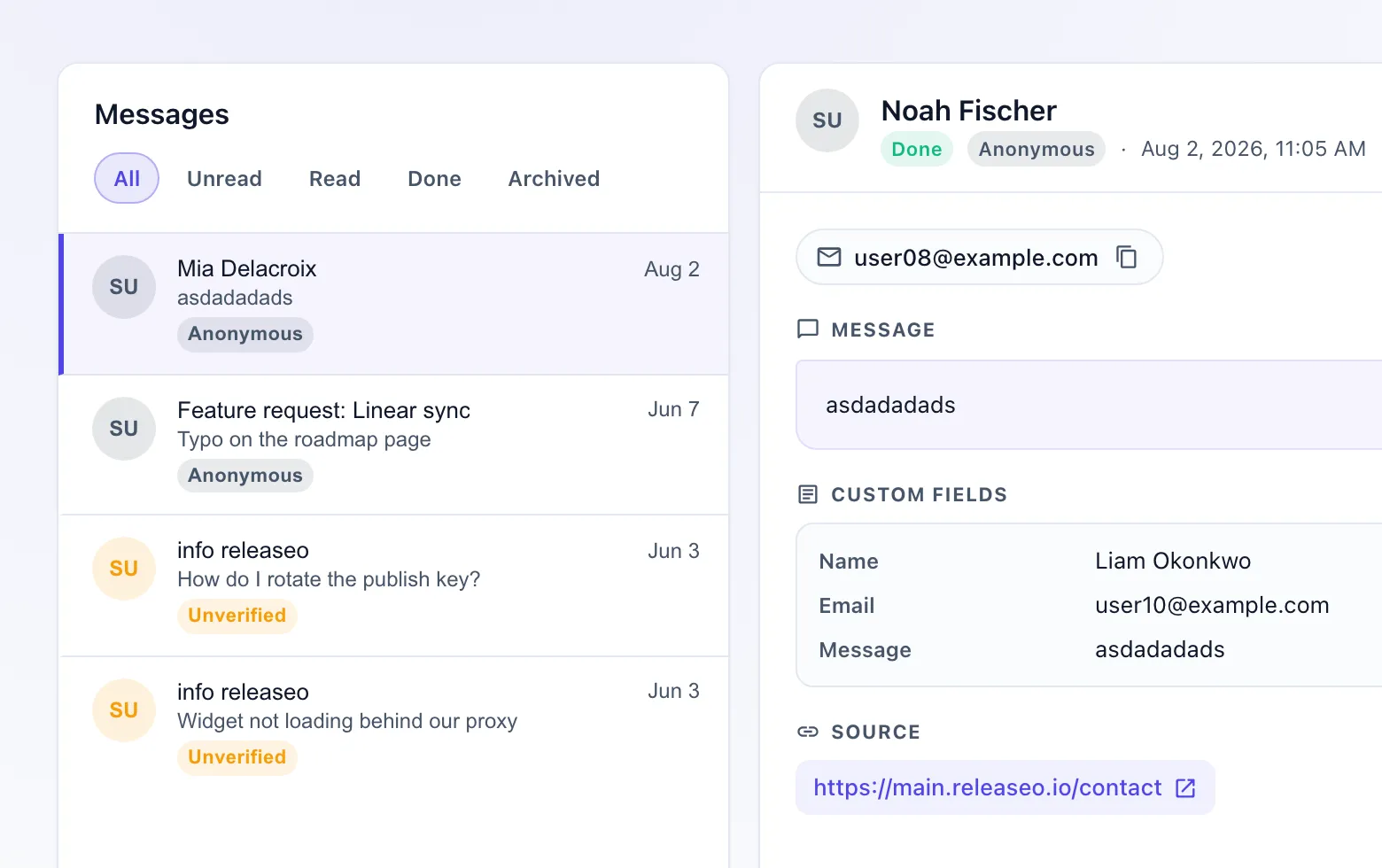
The Releaseo contact inbox message list: three private messages with sender avatars, preview lines and dates — one from 'test' dated Jun 7 tagged Anonymous, and two from 'info releaseo' dated Jun 3, each tagged Unverified.

A private reply,
not a public thread.

Messages sent from the widget land in one inbox, tagged by how far the sender is verified. Bodies are encrypted at rest with a key version, every action is written to an audit log, and the export drops the email address.

Each message moves

  1. Unread
  2. Read
  3. Done
  4. Archived

Exporting is itself an audited event — the row says who exported it, and when.

A public site your
customers actually visit.

Changelog, roadmap, feature requests and a help centre, on your own domain and in your brand. Not a widget in the corner of your app — an address you can put in an email.

yourbrand.com / changelog
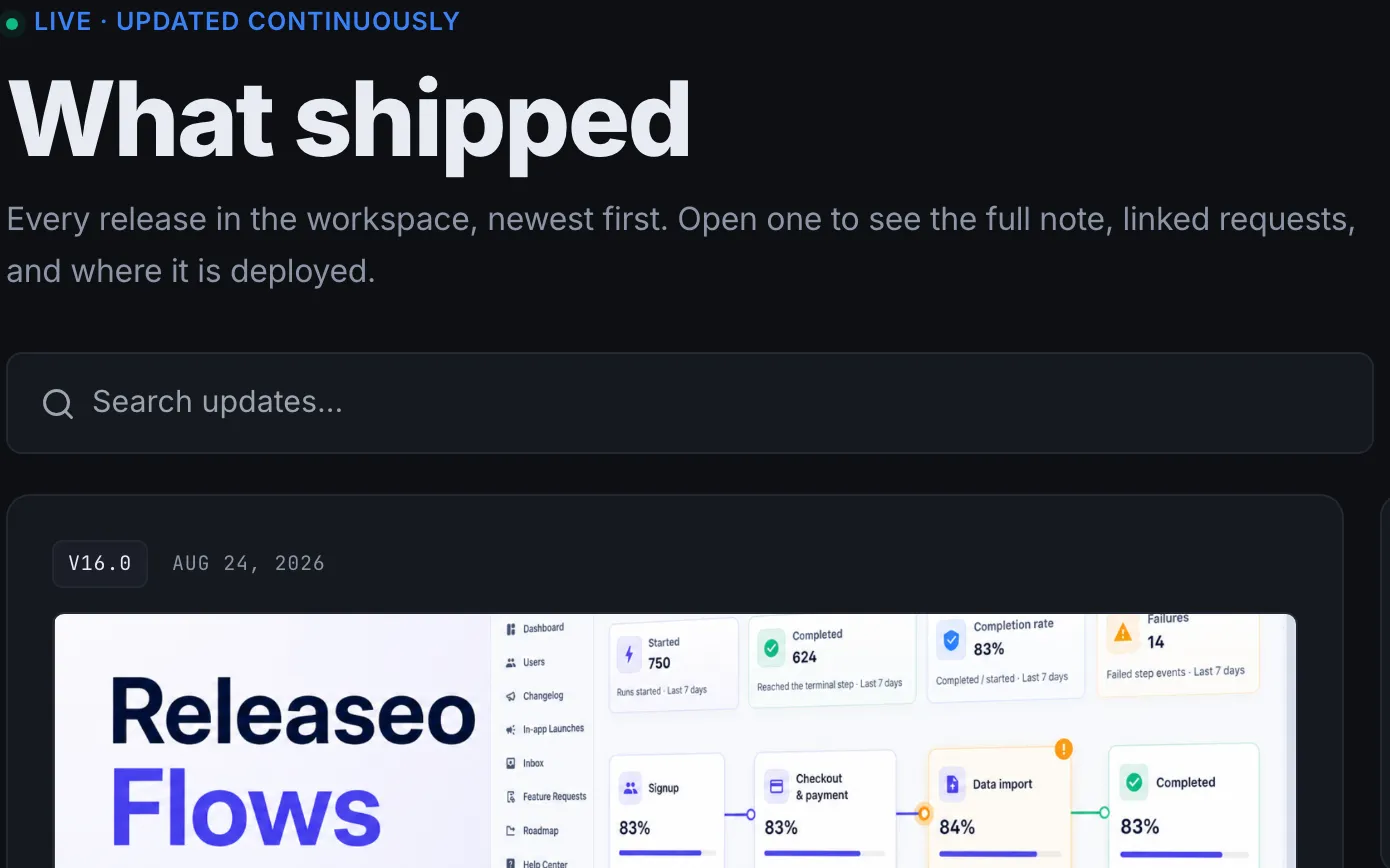
A Releaseo-hosted public site in dark mode, seen the way a customer sees it: a green 'Live — updated continuously' badge, the headline 'What shipped', the line 'Every release in the workspace, newest first. Open one to see the full note, linked requests, and where it is deployed.', a 'Search updates' field, and the newest entry stamped V16.0 · Aug 24, 2026 with its 'Releaseo Flows' cover image.

This is the customer’s view.Not the dashboard. This is the page your users land on, search and subscribe to — published from the editor your team works in.

The same posts you write in Releaseo, rendered as a site of your own rather than a panel inside ours.
  • Domain

    Your brand, your address.

    Logo, colours, fonts and cover art, on a domain your customers already trust. Your own domain comes with Pro; before that it is a releaseo.io subdomain.

  • Templates

    16 templates, nine page types.

    Four boards, their four detail pages and the idea form. Pick a template once and it dresses every one of them — you are not styling nine pages by hand.

  • Speed

    A separate app, not a bolt-on.

    The public site renders on its own servers, so none of it is added to your product's bundle and none of it slows your app down.

Ship the next thing. This
time, let them hear it.

Free plan, one script tag, and a loop that finishes itself. CRPTON already runs on it — join them.